<!DOCTYPE html>
    <html lang="vi" xmlns="http://www.w3.org/1999/xhtml" prefix="og: http://ogp.me/ns#">
    <head>
<title>Hướng dẫn cách thêm, thay đổi, xóa số điện thoại khôi phục Gmail</title>
<meta name="description" content="Hướng dẫn cách thêm, thay đổi, xóa số điện thoại khôi phục Gmail - Savefile - Tin Tức">
<meta name="author" content="Tiểu học Thạnh Phước">
<meta name="copyright" content="Tiểu học Thạnh Phước [tieuhoc@thanhphuoc.edu.vn]">
<meta name="generator" content="NukeViet v4.5">
<meta http-equiv="Content-Type" content="text/html; charset=utf-8">
<meta property="og:title" content="Hướng dẫn cách thêm, thay đổi, xóa số điện thoại khôi phục Gmail">
<meta property="og:type" content="website">
<meta property="og:description" content="Savefile - Tin Tức">
<meta property="og:site_name" content="Tiểu học Thạnh Phước">
<link rel="shortcut icon" href="http://thanhphuoc.edu.vn/uploads/unnamed.webp">
<link rel="canonical" href="http://thanhphuoc.edu.vn/vi/news/hoat-dong-cong-nghe-thong-tin/huong-dan-cach-them-thay-doi-xoa-so-dien-thoai-khoi-phuc-gmail-18.html">
<link rel="alternate" href="http://thanhphuoc.edu.vn/vi/news/rss/" title="Tin Tức" type="application/rss+xml">
<link rel="alternate" href="http://thanhphuoc.edu.vn/vi/news/rss/hoat-dong-chuyen-mon/" title="Tin Tức - Hoạt động Chuyên môn" type="application/rss+xml">
<link rel="alternate" href="http://thanhphuoc.edu.vn/vi/news/rss/chi-bo/" title="Tin Tức - Hoạt động Chi bộ" type="application/rss+xml">
<link rel="alternate" href="http://thanhphuoc.edu.vn/vi/news/rss/cong-doan/" title="Tin Tức - Hoạt động Công đoàn" type="application/rss+xml">
<link rel="alternate" href="http://thanhphuoc.edu.vn/vi/news/rss/hoat-dong-tai-chinh/" title="Tin Tức - Hoạt động Tài chính" type="application/rss+xml">
<link rel="alternate" href="http://thanhphuoc.edu.vn/vi/news/rss/hoat-dong-doan-hoi-doi/" title="Tin Tức - Hoạt động Đoàn-Hội-Đội" type="application/rss+xml">
<link rel="alternate" href="http://thanhphuoc.edu.vn/vi/news/rss/hoat-dong-cong-nghe-thong-tin/" title="Tin Tức - Hoạt động Công nghệ Thông tin" type="application/rss+xml">
<link rel="alternate" href="http://thanhphuoc.edu.vn/vi/news/rss/hoat-dong-thu-vien-thiet-bi/" title="Tin Tức - Hoạt động Thư viện - Thiết bị" type="application/rss+xml">
<link rel="alternate" href="http://thanhphuoc.edu.vn/vi/news/rss/hoat-dong-thi-dua-khen-thuong/" title="Tin Tức - Hoạt động Thi đua - Khen thưởng" type="application/rss+xml">
<link rel="preload" as="style" href="http://thanhphuoc.edu.vn/assets/css/font-awesome.min.css" type="text/css">
<link rel="preload" as="style" href="http://thanhphuoc.edu.vn/themes/default/css/bootstrap.non-responsive.css" type="text/css">
<link rel="preload" as="style" href="http://thanhphuoc.edu.vn/themes/default/css/style.css" type="text/css">
<link rel="preload" as="style" href="http://thanhphuoc.edu.vn/themes/default/css/style.non-responsive.css" type="text/css">
<link rel="preload" as="style" href="http://thanhphuoc.edu.vn/themes/default/css/news.css" type="text/css">
<link rel="preload" as="style" href="http://thanhphuoc.edu.vn/themes/default/css/custom.css" type="text/css">
<link rel="preload" as="script" href="http://thanhphuoc.edu.vn/assets/js/jquery/jquery.min.js" type="text/javascript">
<link rel="preload" as="script" href="http://thanhphuoc.edu.vn/assets/js/language/vi.js" type="text/javascript">
<link rel="preload" as="script" href="http://thanhphuoc.edu.vn/assets/js/DOMPurify/purify.js" type="text/javascript">
<link rel="preload" as="script" href="http://thanhphuoc.edu.vn/assets/js/global.js" type="text/javascript">
<link rel="preload" as="script" href="http://thanhphuoc.edu.vn/assets/js/site.js" type="text/javascript">
<link rel="preload" as="script" href="http://thanhphuoc.edu.vn/themes/default/js/news.js" type="text/javascript">
<link rel="preload" as="script" href="http://thanhphuoc.edu.vn/themes/default/js/main.js" type="text/javascript">
<link rel="preload" as="script" href="http://thanhphuoc.edu.vn/themes/default/js/custom.js" type="text/javascript">
<link rel="preload" as="script" href="http://thanhphuoc.edu.vn/themes/default/js/bootstrap.min.js" type="text/javascript">
<link rel="stylesheet" href="http://thanhphuoc.edu.vn/assets/css/font-awesome.min.css">
<link rel="stylesheet" href="http://thanhphuoc.edu.vn/themes/default/css/bootstrap.non-responsive.css">
<link rel="stylesheet" href="http://thanhphuoc.edu.vn/themes/default/css/style.css">
<link rel="stylesheet" href="http://thanhphuoc.edu.vn/themes/default/css/style.non-responsive.css">
<link rel="StyleSheet" href="http://thanhphuoc.edu.vn/themes/default/css/news.css">
<link rel="stylesheet" href="http://thanhphuoc.edu.vn/themes/default/css/custom.css">
<style>
	body{background: #fff;}
</style>
    </head>
    <body>
<div id="print">
	<div id="hd_print">
		<h2 class="pull-left">Tiểu học Thạnh Phước</h2>
		<p class="pull-right"><a title="Tiểu học Thạnh Phước" href="http://thanhphuoc.edu.vn/">http://thanhphuoc.edu.vn</a></p>
	</div>
	<div class="clear"></div>
	<hr />
	<div id="content">
		<h1>Hướng dẫn cách thêm, thay đổi, xóa số điện thoại khôi phục Gmail</h1>
		<ul class="list-inline">
			<li>Thứ hai - 27/02/2023 09:36</li>
			<li class="hidden-print txtrequired"><em class="fa fa-print">&nbsp;</em><a title="In ra" href="javascript:;" onclick="window.print()">In ra</a></li>
			<li class="hidden-print txtrequired"><em class="fa fa-power-off">&nbsp;</em><a title="Đóng cửa sổ này" href="javascript:;" onclick="window.close()">Đóng cửa sổ này</a></li>
		</ul>
		<div class="clear"></div>
		<div id="hometext">
			Cách thêm, thay đổi, xóa số điện thoại khôi phục Gmail, bảo mật Gmail. Số điện thoại này dùng để khôi phục mật khẩu khi bạn quên hoặc mất. Rất quan trọng đó.
		</div>
				<div class="imghome">
			<img alt="undefined" src="http://thanhphuoc.edu.vn/uploads/news/2023_02/them-doi-xoa-so-dien-thoai-khoi-phuc-gmail-3.png" width="460" class="img-thumbnail" />
		</div>
		<div class="clear"></div>
		<div id="bodytext" class="clearfix">
			<p>&nbsp;</p>
&nbsp;

<p><span style="font-size:14px;">Đây là một trong những thiết lập&nbsp;<a href="https://dangkygmail.com/bao-mat/" rel="noopener noreferrer" target="_blank">bảo mật Gmail</a>&nbsp;bạn không nên bỏ qua. Hướng dẫn bên dưới được chia là 3 phần, trong đó:</span></p>

<h2><span style="font-size:14px;"><strong>1. Cách thêm số điện thoại khôi phục tài khoản Gmail</strong></span></h2>

<p><span style="font-size:14px;">Bước 1: Mở thiết lập số điện thoại cho&nbsp;<a href="https://dangkygmail.com/" rel="noopener noreferrer" target="_blank">tài khoản Gmail</a>&nbsp;theo link này:&nbsp;<a href="https://myaccount.google.com/phone" rel="noopener noreferrer" target="_blank">https://myaccount.google.com/phone</a></span></p>

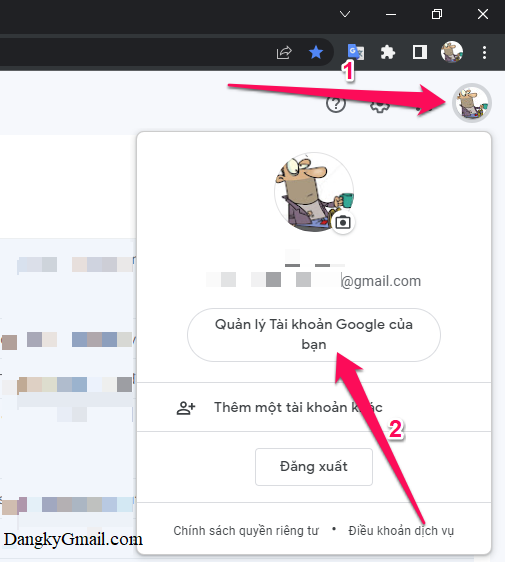
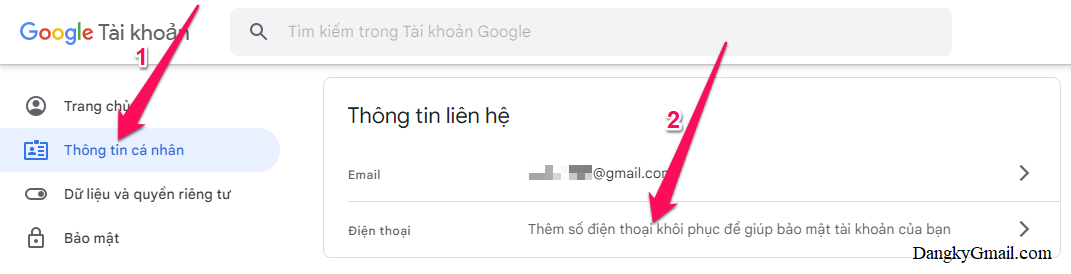
<p><span style="font-size:14px;">hoặc theo cách thủ công:&nbsp;Trong hòm thư Gmail, bạn nhấn vào ảnh đại diện (góc trên cùng bên phải) chọn&nbsp;&nbsp;Quản lý Tài khoản của tôi&nbsp;&nbsp;→ Nhấn chọn&nbsp;&nbsp;Thông tin cá nhân&nbsp;&nbsp;trong menu bên trái → nhìn sang bên phải nhấn vào phần&nbsp;&nbsp;Điện thoại&nbsp;</span></p>

<figure><span style="font-size:14px;"><a data-rel="lightbox-gallery-1" data-rl_caption="" data-rl_title="" href="https://dangkygmail.com/wp-content/uploads/2016/03/Them-doi-xoa-so-dien-thoai-khoi-phuc-Gmail-1.png" title=""><img alt="undefined" aria-describedby="gallery-1-1493" height="562" loading="lazy" sizes="(max-width: 505px) 100vw, 505px" src="http://thanhphuoc.edu.vn/uploads/news/2023_02/them-doi-xoa-so-dien-thoai-khoi-phuc-gmail-1.png" srcset="https://dangkygmail.com/wp-content/uploads/2016/03/Them-doi-xoa-so-dien-thoai-khoi-phuc-Gmail-1.png 505w, https://dangkygmail.com/wp-content/uploads/2016/03/Them-doi-xoa-so-dien-thoai-khoi-phuc-Gmail-1-135x150.png 135w, https://dangkygmail.com/wp-content/uploads/2016/03/Them-doi-xoa-so-dien-thoai-khoi-phuc-Gmail-1-270x300.png 270w, https://dangkygmail.com/wp-content/uploads/2016/03/Them-doi-xoa-so-dien-thoai-khoi-phuc-Gmail-1-58x65.png 58w, https://dangkygmail.com/wp-content/uploads/2016/03/Them-doi-xoa-so-dien-thoai-khoi-phuc-Gmail-1-198x220.png 198w, https://dangkygmail.com/wp-content/uploads/2016/03/Them-doi-xoa-so-dien-thoai-khoi-phuc-Gmail-1-90x100.png 90w, https://dangkygmail.com/wp-content/uploads/2016/03/Them-doi-xoa-so-dien-thoai-khoi-phuc-Gmail-1-146x162.png 146w, https://dangkygmail.com/wp-content/uploads/2016/03/Them-doi-xoa-so-dien-thoai-khoi-phuc-Gmail-1-144x160.png 144w, https://dangkygmail.com/wp-content/uploads/2016/03/Them-doi-xoa-so-dien-thoai-khoi-phuc-Gmail-1-313x348.png 313w, https://dangkygmail.com/wp-content/uploads/2016/03/Them-doi-xoa-so-dien-thoai-khoi-phuc-Gmail-1-363x404.png 363w, https://dangkygmail.com/wp-content/uploads/2016/03/Them-doi-xoa-so-dien-thoai-khoi-phuc-Gmail-1-467x520.png 467w, https://dangkygmail.com/wp-content/uploads/2016/03/Them-doi-xoa-so-dien-thoai-khoi-phuc-Gmail-1-77x86.png 77w" width="505" /></a></span>

<figcaption id="gallery-1-1493"><span style="font-size:14px;">Nhấn vào ảnh đại diện của bạn chọn Quản lý Tài khoản của tôi</span></figcaption>
</figure>

<figure><span style="font-size:14px;"><a data-rel="lightbox-gallery-1" data-rl_caption="" data-rl_title="" href="https://dangkygmail.com/wp-content/uploads/2016/03/Them-doi-xoa-so-dien-thoai-khoi-phuc-Gmail-2.png" title=""><img alt="undefined" aria-describedby="gallery-1-1495" height="262" loading="lazy" sizes="(max-width: 1024px) 100vw, 1024px" src="http://thanhphuoc.edu.vn/uploads/news/2023_02/them-doi-xoa-so-dien-thoai-khoi-phuc-gmail-2-1024x262.png" srcset="https://dangkygmail.com/wp-content/uploads/2016/03/Them-doi-xoa-so-dien-thoai-khoi-phuc-Gmail-2-1024x262.png 1024w, https://dangkygmail.com/wp-content/uploads/2016/03/Them-doi-xoa-so-dien-thoai-khoi-phuc-Gmail-2-150x38.png 150w, https://dangkygmail.com/wp-content/uploads/2016/03/Them-doi-xoa-so-dien-thoai-khoi-phuc-Gmail-2-300x77.png 300w, https://dangkygmail.com/wp-content/uploads/2016/03/Them-doi-xoa-so-dien-thoai-khoi-phuc-Gmail-2-768x196.png 768w, https://dangkygmail.com/wp-content/uploads/2016/03/Them-doi-xoa-so-dien-thoai-khoi-phuc-Gmail-2-65x17.png 65w, https://dangkygmail.com/wp-content/uploads/2016/03/Them-doi-xoa-so-dien-thoai-khoi-phuc-Gmail-2-220x56.png 220w, https://dangkygmail.com/wp-content/uploads/2016/03/Them-doi-xoa-so-dien-thoai-khoi-phuc-Gmail-2-250x64.png 250w, https://dangkygmail.com/wp-content/uploads/2016/03/Them-doi-xoa-so-dien-thoai-khoi-phuc-Gmail-2-510x130.png 510w, https://dangkygmail.com/wp-content/uploads/2016/03/Them-doi-xoa-so-dien-thoai-khoi-phuc-Gmail-2-696x178.png 696w, https://dangkygmail.com/wp-content/uploads/2016/03/Them-doi-xoa-so-dien-thoai-khoi-phuc-Gmail-2-807x206.png 807w, https://dangkygmail.com/wp-content/uploads/2016/03/Them-doi-xoa-so-dien-thoai-khoi-phuc-Gmail-2-1040x266.png 1040w, https://dangkygmail.com/wp-content/uploads/2016/03/Them-doi-xoa-so-dien-thoai-khoi-phuc-Gmail-2-86x22.png 86w, https://dangkygmail.com/wp-content/uploads/2016/03/Them-doi-xoa-so-dien-thoai-khoi-phuc-Gmail-2.png 1071w" width="1024" /></a></span>

<figcaption id="gallery-1-1495"><span style="font-size:14px;">Nhấn chọn Thông tin cá nhân trong menu bên trái → nhìn sang bên phải nhấn vào phần Điện thoại</span></figcaption>
</figure>

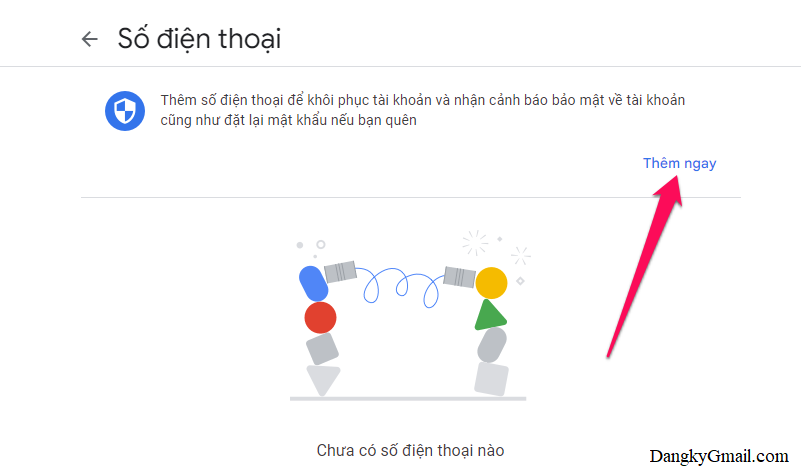
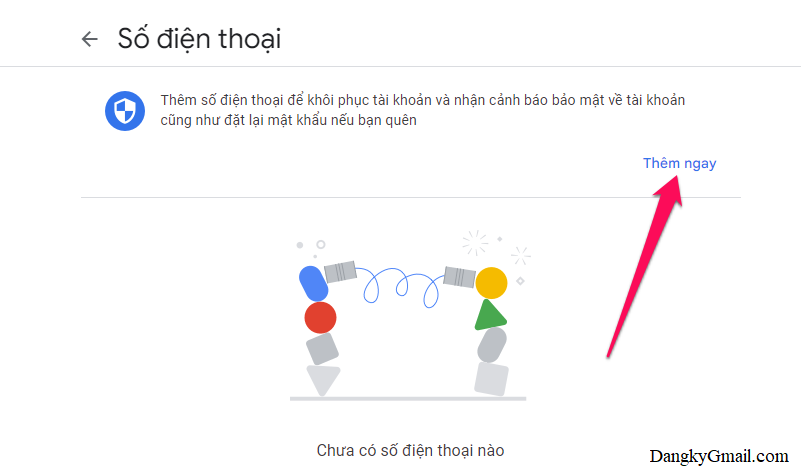
<p><span style="font-size:14px;">Bước 2: Nhấn nút&nbsp;&nbsp;Thêm ngay&nbsp;</span></p>

<p><span style="font-size:14px;"><a data-rel="lightbox-image-0" data-rl_caption="" data-rl_title="" href="https://dangkygmail.com/wp-content/uploads/2016/03/Them-doi-xoa-so-dien-thoai-khoi-phuc-Gmail-3.png" title=""><img alt="undefined" height="476" sizes="(max-width: 801px) 100vw, 801px" src="http://thanhphuoc.edu.vn/uploads/news/2023_02/them-doi-xoa-so-dien-thoai-khoi-phuc-gmail-3_1.png" srcset="https://dangkygmail.com/wp-content/uploads/2016/03/Them-doi-xoa-so-dien-thoai-khoi-phuc-Gmail-3.png 801w, https://dangkygmail.com/wp-content/uploads/2016/03/Them-doi-xoa-so-dien-thoai-khoi-phuc-Gmail-3-150x89.png 150w, https://dangkygmail.com/wp-content/uploads/2016/03/Them-doi-xoa-so-dien-thoai-khoi-phuc-Gmail-3-300x178.png 300w, https://dangkygmail.com/wp-content/uploads/2016/03/Them-doi-xoa-so-dien-thoai-khoi-phuc-Gmail-3-768x456.png 768w, https://dangkygmail.com/wp-content/uploads/2016/03/Them-doi-xoa-so-dien-thoai-khoi-phuc-Gmail-3-65x39.png 65w, https://dangkygmail.com/wp-content/uploads/2016/03/Them-doi-xoa-so-dien-thoai-khoi-phuc-Gmail-3-220x131.png 220w, https://dangkygmail.com/wp-content/uploads/2016/03/Them-doi-xoa-so-dien-thoai-khoi-phuc-Gmail-3-168x100.png 168w, https://dangkygmail.com/wp-content/uploads/2016/03/Them-doi-xoa-so-dien-thoai-khoi-phuc-Gmail-3-273x162.png 273w, https://dangkygmail.com/wp-content/uploads/2016/03/Them-doi-xoa-so-dien-thoai-khoi-phuc-Gmail-3-250x149.png 250w, https://dangkygmail.com/wp-content/uploads/2016/03/Them-doi-xoa-so-dien-thoai-khoi-phuc-Gmail-3-586x348.png 586w, https://dangkygmail.com/wp-content/uploads/2016/03/Them-doi-xoa-so-dien-thoai-khoi-phuc-Gmail-3-680x404.png 680w, https://dangkygmail.com/wp-content/uploads/2016/03/Them-doi-xoa-so-dien-thoai-khoi-phuc-Gmail-3-86x51.png 86w" title="Nhấn nút Thêm ngay" width="801" /></a></span></p>

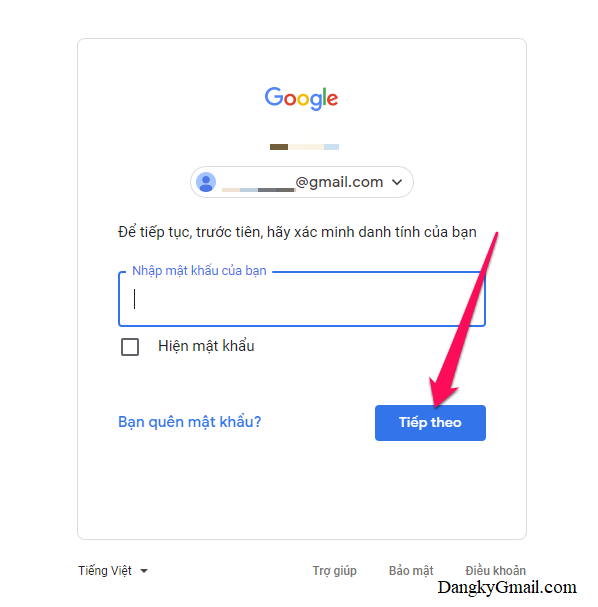
<p><span style="font-size:14px;">Bước 3:&nbsp;<a href="https://dangkygmail.com/dang-nhap-dang-xuat-gmail-tren-may-tinh/" rel="noopener noreferrer" target="_blank">Đăng nhập lại tài khoản Gmail</a>&nbsp;nếu được yêu cầu</span></p>

<p><span style="font-size:14px;"><a data-rel="lightbox-image-1" data-rl_caption="" data-rl_title="" href="https://dangkygmail.com/wp-content/uploads/2016/03/Them-doi-xoa-so-dien-thoai-khoi-phuc-Gmail-4.png" title=""><img alt="undefined" height="607" loading="lazy" sizes="(max-width: 598px) 100vw, 598px" src="http://thanhphuoc.edu.vn/uploads/news/2023_02/them-doi-xoa-so-dien-thoai-khoi-phuc-gmail-4.png" srcset="https://dangkygmail.com/wp-content/uploads/2016/03/Them-doi-xoa-so-dien-thoai-khoi-phuc-Gmail-4.png 598w, https://dangkygmail.com/wp-content/uploads/2016/03/Them-doi-xoa-so-dien-thoai-khoi-phuc-Gmail-4-148x150.png 148w, https://dangkygmail.com/wp-content/uploads/2016/03/Them-doi-xoa-so-dien-thoai-khoi-phuc-Gmail-4-296x300.png 296w, https://dangkygmail.com/wp-content/uploads/2016/03/Them-doi-xoa-so-dien-thoai-khoi-phuc-Gmail-4-65x65.png 65w, https://dangkygmail.com/wp-content/uploads/2016/03/Them-doi-xoa-so-dien-thoai-khoi-phuc-Gmail-4-217x220.png 217w, https://dangkygmail.com/wp-content/uploads/2016/03/Them-doi-xoa-so-dien-thoai-khoi-phuc-Gmail-4-99x100.png 99w, https://dangkygmail.com/wp-content/uploads/2016/03/Them-doi-xoa-so-dien-thoai-khoi-phuc-Gmail-4-160x162.png 160w, https://dangkygmail.com/wp-content/uploads/2016/03/Them-doi-xoa-so-dien-thoai-khoi-phuc-Gmail-4-158x160.png 158w, https://dangkygmail.com/wp-content/uploads/2016/03/Them-doi-xoa-so-dien-thoai-khoi-phuc-Gmail-4-343x348.png 343w, https://dangkygmail.com/wp-content/uploads/2016/03/Them-doi-xoa-so-dien-thoai-khoi-phuc-Gmail-4-398x404.png 398w, https://dangkygmail.com/wp-content/uploads/2016/03/Them-doi-xoa-so-dien-thoai-khoi-phuc-Gmail-4-512x520.png 512w, https://dangkygmail.com/wp-content/uploads/2016/03/Them-doi-xoa-so-dien-thoai-khoi-phuc-Gmail-4-86x86.png 86w" title="Đăng nhập lại tài khoản Gmail nếu được yêu cầu" width="598" /></a></span></p>

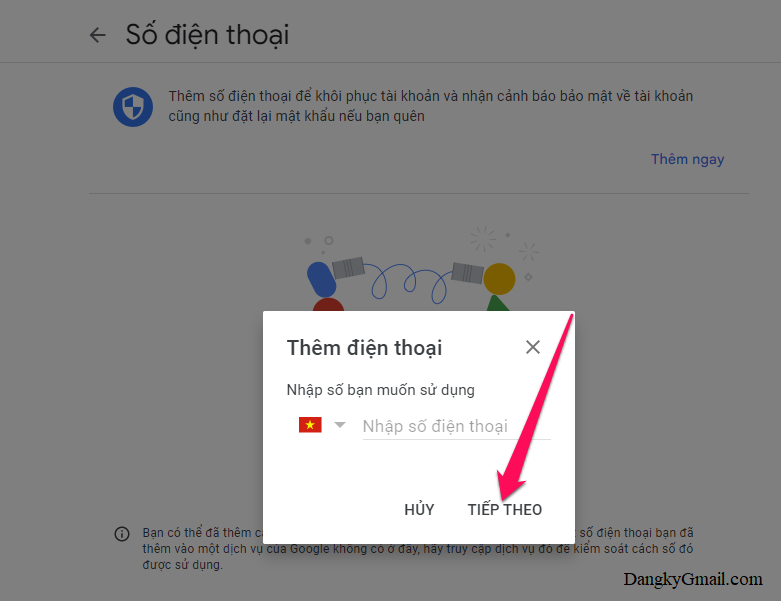
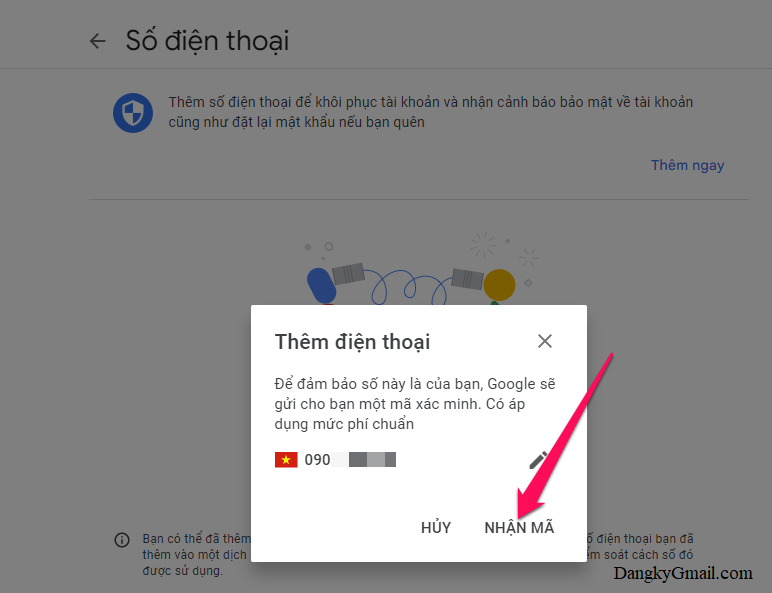
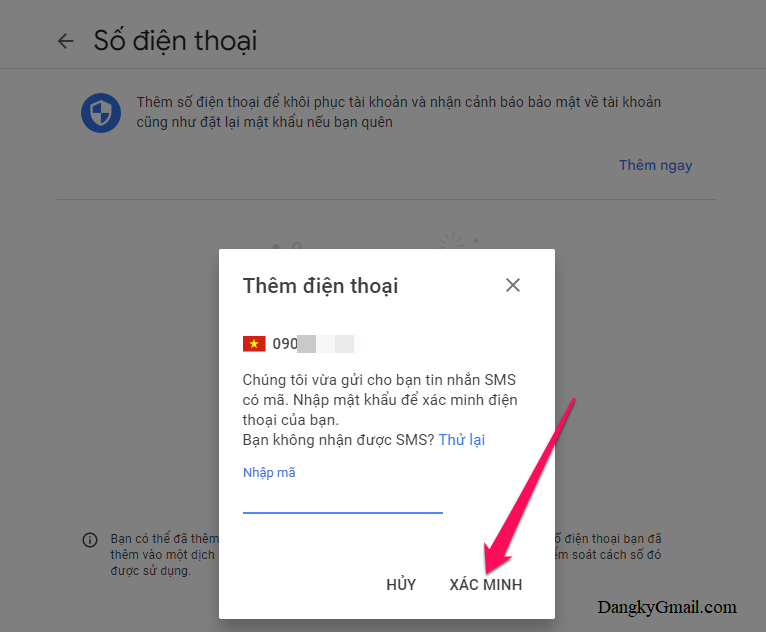
<p><span style="font-size:14px;">Bước 4: Nhập số điện thoại vào rồi nhấn nút&nbsp;&nbsp;Tiếp Theo&nbsp;&nbsp;→ Nhấn nút&nbsp;&nbsp;Nhận Mã&nbsp;&nbsp;→ Nhập mã xác minh (bao gồm 6 số) gửi về điện thoại rồi nhấn nút&nbsp;&nbsp;Xác Minh&nbsp;</span></p>

<p><span style="font-size:14px;">Nếu bạn không nhận được mã xác minh thì nhấn nút&nbsp;&nbsp;Thử lại&nbsp;</span></p>

<figure><span style="font-size:14px;"><a data-rel="lightbox-gallery-2" data-rl_caption="" data-rl_title="" href="https://dangkygmail.com/wp-content/uploads/2016/03/Them-doi-xoa-so-dien-thoai-khoi-phuc-Gmail-5.png" title=""><img alt="undefined" aria-describedby="gallery-2-1498" height="231" loading="lazy" sizes="(max-width: 300px) 100vw, 300px" src="http://thanhphuoc.edu.vn/uploads/news/2023_02/them-doi-xoa-so-dien-thoai-khoi-phuc-gmail-5-300x231.png" srcset="https://dangkygmail.com/wp-content/uploads/2016/03/Them-doi-xoa-so-dien-thoai-khoi-phuc-Gmail-5-300x231.png 300w, https://dangkygmail.com/wp-content/uploads/2016/03/Them-doi-xoa-so-dien-thoai-khoi-phuc-Gmail-5-150x115.png 150w, https://dangkygmail.com/wp-content/uploads/2016/03/Them-doi-xoa-so-dien-thoai-khoi-phuc-Gmail-5-768x591.png 768w, https://dangkygmail.com/wp-content/uploads/2016/03/Them-doi-xoa-so-dien-thoai-khoi-phuc-Gmail-5-65x50.png 65w, https://dangkygmail.com/wp-content/uploads/2016/03/Them-doi-xoa-so-dien-thoai-khoi-phuc-Gmail-5-220x169.png 220w, https://dangkygmail.com/wp-content/uploads/2016/03/Them-doi-xoa-so-dien-thoai-khoi-phuc-Gmail-5-130x100.png 130w, https://dangkygmail.com/wp-content/uploads/2016/03/Them-doi-xoa-so-dien-thoai-khoi-phuc-Gmail-5-211x162.png 211w, https://dangkygmail.com/wp-content/uploads/2016/03/Them-doi-xoa-so-dien-thoai-khoi-phuc-Gmail-5-208x160.png 208w, https://dangkygmail.com/wp-content/uploads/2016/03/Them-doi-xoa-so-dien-thoai-khoi-phuc-Gmail-5-452x348.png 452w, https://dangkygmail.com/wp-content/uploads/2016/03/Them-doi-xoa-so-dien-thoai-khoi-phuc-Gmail-5-525x404.png 525w, https://dangkygmail.com/wp-content/uploads/2016/03/Them-doi-xoa-so-dien-thoai-khoi-phuc-Gmail-5-676x520.png 676w, https://dangkygmail.com/wp-content/uploads/2016/03/Them-doi-xoa-so-dien-thoai-khoi-phuc-Gmail-5-86x66.png 86w, https://dangkygmail.com/wp-content/uploads/2016/03/Them-doi-xoa-so-dien-thoai-khoi-phuc-Gmail-5.png 781w" width="300" /></a></span>

<figcaption id="gallery-2-1498"><span style="font-size:14px;">Nhập số điện thoại vào rồi nhấn nút Tiếp Theo</span></figcaption>
</figure>

<figure><span style="font-size:14px;"><a data-rel="lightbox-gallery-2" data-rl_caption="" data-rl_title="" href="https://dangkygmail.com/wp-content/uploads/2016/03/Them-doi-xoa-so-dien-thoai-khoi-phuc-Gmail-6.png" title=""><img alt="undefined" aria-describedby="gallery-2-1499" height="230" loading="lazy" sizes="(max-width: 300px) 100vw, 300px" src="http://thanhphuoc.edu.vn/uploads/news/2023_02/them-doi-xoa-so-dien-thoai-khoi-phuc-gmail-6-300x230.png" srcset="https://dangkygmail.com/wp-content/uploads/2016/03/Them-doi-xoa-so-dien-thoai-khoi-phuc-Gmail-6-300x230.png 300w, https://dangkygmail.com/wp-content/uploads/2016/03/Them-doi-xoa-so-dien-thoai-khoi-phuc-Gmail-6-150x115.png 150w, https://dangkygmail.com/wp-content/uploads/2016/03/Them-doi-xoa-so-dien-thoai-khoi-phuc-Gmail-6-768x590.png 768w, https://dangkygmail.com/wp-content/uploads/2016/03/Them-doi-xoa-so-dien-thoai-khoi-phuc-Gmail-6-65x50.png 65w, https://dangkygmail.com/wp-content/uploads/2016/03/Them-doi-xoa-so-dien-thoai-khoi-phuc-Gmail-6-220x169.png 220w, https://dangkygmail.com/wp-content/uploads/2016/03/Them-doi-xoa-so-dien-thoai-khoi-phuc-Gmail-6-130x100.png 130w, https://dangkygmail.com/wp-content/uploads/2016/03/Them-doi-xoa-so-dien-thoai-khoi-phuc-Gmail-6-211x162.png 211w, https://dangkygmail.com/wp-content/uploads/2016/03/Them-doi-xoa-so-dien-thoai-khoi-phuc-Gmail-6-208x160.png 208w, https://dangkygmail.com/wp-content/uploads/2016/03/Them-doi-xoa-so-dien-thoai-khoi-phuc-Gmail-6-453x348.png 453w, https://dangkygmail.com/wp-content/uploads/2016/03/Them-doi-xoa-so-dien-thoai-khoi-phuc-Gmail-6-526x404.png 526w, https://dangkygmail.com/wp-content/uploads/2016/03/Them-doi-xoa-so-dien-thoai-khoi-phuc-Gmail-6-677x520.png 677w, https://dangkygmail.com/wp-content/uploads/2016/03/Them-doi-xoa-so-dien-thoai-khoi-phuc-Gmail-6-86x66.png 86w, https://dangkygmail.com/wp-content/uploads/2016/03/Them-doi-xoa-so-dien-thoai-khoi-phuc-Gmail-6.png 772w" width="300" /></a></span>

<figcaption id="gallery-2-1499"><span style="font-size:14px;">Nhấn nút Nhận Mã</span></figcaption>
</figure>

<figure><span style="font-size:14px;"><a data-rel="lightbox-gallery-2" data-rl_caption="" data-rl_title="" href="https://dangkygmail.com/wp-content/uploads/2016/03/Them-doi-xoa-so-dien-thoai-khoi-phuc-Gmail-7.png" title=""><img alt="undefined" aria-describedby="gallery-2-1500" height="248" loading="lazy" sizes="(max-width: 300px) 100vw, 300px" src="http://thanhphuoc.edu.vn/uploads/news/2023_02/them-doi-xoa-so-dien-thoai-khoi-phuc-gmail-7-300x248.png" srcset="https://dangkygmail.com/wp-content/uploads/2016/03/Them-doi-xoa-so-dien-thoai-khoi-phuc-Gmail-7-300x248.png 300w, https://dangkygmail.com/wp-content/uploads/2016/03/Them-doi-xoa-so-dien-thoai-khoi-phuc-Gmail-7-150x124.png 150w, https://dangkygmail.com/wp-content/uploads/2016/03/Them-doi-xoa-so-dien-thoai-khoi-phuc-Gmail-7-65x54.png 65w, https://dangkygmail.com/wp-content/uploads/2016/03/Them-doi-xoa-so-dien-thoai-khoi-phuc-Gmail-7-220x182.png 220w, https://dangkygmail.com/wp-content/uploads/2016/03/Them-doi-xoa-so-dien-thoai-khoi-phuc-Gmail-7-121x100.png 121w, https://dangkygmail.com/wp-content/uploads/2016/03/Them-doi-xoa-so-dien-thoai-khoi-phuc-Gmail-7-196x162.png 196w, https://dangkygmail.com/wp-content/uploads/2016/03/Them-doi-xoa-so-dien-thoai-khoi-phuc-Gmail-7-194x160.png 194w, https://dangkygmail.com/wp-content/uploads/2016/03/Them-doi-xoa-so-dien-thoai-khoi-phuc-Gmail-7-422x348.png 422w, https://dangkygmail.com/wp-content/uploads/2016/03/Them-doi-xoa-so-dien-thoai-khoi-phuc-Gmail-7-490x404.png 490w, https://dangkygmail.com/wp-content/uploads/2016/03/Them-doi-xoa-so-dien-thoai-khoi-phuc-Gmail-7-630x520.png 630w, https://dangkygmail.com/wp-content/uploads/2016/03/Them-doi-xoa-so-dien-thoai-khoi-phuc-Gmail-7-86x71.png 86w, https://dangkygmail.com/wp-content/uploads/2016/03/Them-doi-xoa-so-dien-thoai-khoi-phuc-Gmail-7.png 766w" width="300" /></a></span>

<figcaption id="gallery-2-1500"><span style="font-size:14px;">Nhập mã xác minh (bao gồm 6 số) gửi về điện thoại rồi nhấn nút Xác Minh</span></figcaption>
</figure>

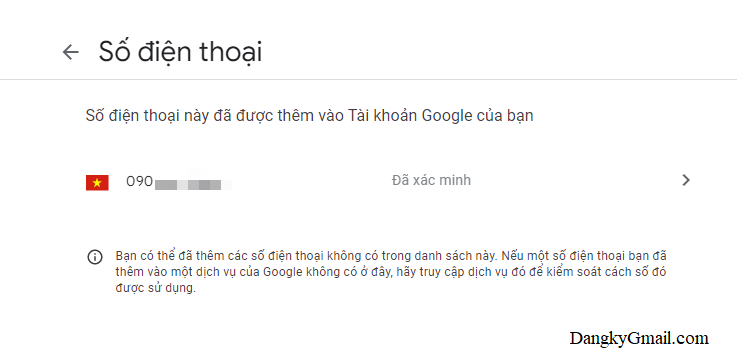
<p><span style="font-size:14px;">Bước 5:&nbsp;<strong>Thêm số điện thoại khôi phục Gmail</strong>&nbsp;thành công. Lúc này bạn sẽ thấy số điện thoại được thêm vào và có dòng&nbsp;&nbsp;Đã xác minh&nbsp;&nbsp;bên cạnh</span></p>

<p><span style="font-size:14px;"><a data-rel="lightbox-image-2" data-rl_caption="" data-rl_title="" href="https://dangkygmail.com/wp-content/uploads/2016/03/Them-doi-xoa-so-dien-thoai-khoi-phuc-Gmail-8.png" title=""><img alt="undefined" height="361" loading="lazy" sizes="(max-width: 737px) 100vw, 737px" src="http://thanhphuoc.edu.vn/uploads/news/2023_02/them-doi-xoa-so-dien-thoai-khoi-phuc-gmail-8.png" srcset="https://dangkygmail.com/wp-content/uploads/2016/03/Them-doi-xoa-so-dien-thoai-khoi-phuc-Gmail-8.png 737w, https://dangkygmail.com/wp-content/uploads/2016/03/Them-doi-xoa-so-dien-thoai-khoi-phuc-Gmail-8-150x73.png 150w, https://dangkygmail.com/wp-content/uploads/2016/03/Them-doi-xoa-so-dien-thoai-khoi-phuc-Gmail-8-300x147.png 300w, https://dangkygmail.com/wp-content/uploads/2016/03/Them-doi-xoa-so-dien-thoai-khoi-phuc-Gmail-8-65x32.png 65w, https://dangkygmail.com/wp-content/uploads/2016/03/Them-doi-xoa-so-dien-thoai-khoi-phuc-Gmail-8-220x108.png 220w, https://dangkygmail.com/wp-content/uploads/2016/03/Them-doi-xoa-so-dien-thoai-khoi-phuc-Gmail-8-204x100.png 204w, https://dangkygmail.com/wp-content/uploads/2016/03/Them-doi-xoa-so-dien-thoai-khoi-phuc-Gmail-8-331x162.png 331w, https://dangkygmail.com/wp-content/uploads/2016/03/Them-doi-xoa-so-dien-thoai-khoi-phuc-Gmail-8-250x122.png 250w, https://dangkygmail.com/wp-content/uploads/2016/03/Them-doi-xoa-so-dien-thoai-khoi-phuc-Gmail-8-696x341.png 696w, https://dangkygmail.com/wp-content/uploads/2016/03/Them-doi-xoa-so-dien-thoai-khoi-phuc-Gmail-8-86x42.png 86w" title="Thêm số điện thoại khôi phục Gmail thành công" width="737" /></a></span></p>

<p><span style="font-size:14px;">Mọi thay đổi số điện thoại khôi phục đều sẽ có email thông báo về Gmail từ Google</span></p>

<h2><span style="font-size:14px;"><strong>2. Cách thay đổi số điện thoại khôi phục tài khoản Gmail</strong></span></h2>

<p><span style="font-size:14px;">Bước 1: Mở thiết lập số điện thoại cho tài khoản Gmail theo link này:&nbsp;<a href="https://myaccount.google.com/phone" rel="noopener noreferrer" target="_blank">https://myaccount.google.com/phone</a></span></p>
<span style="font-size:14px;"><iframe allowtransparency="true" data-google-container-id="a!3" data-google-query-id="CNTO8M_VtP0CFWudwgodoqYDyQ" data-load-complete="true" frameborder="0" height="0" hspace="0" id="aswift_2" marginheight="0" marginwidth="0" name="aswift_2" sandbox="allow-forms allow-popups allow-popups-to-escape-sandbox allow-same-origin allow-scripts allow-top-navigation-by-user-activation" scrolling="no" vspace="0" width="833"></iframe></span>

<p><span style="font-size:14px;">hoặc theo cách khác như trong hướng dẫn ở&nbsp;&nbsp;bước 1 phần 1&nbsp;</span></p>

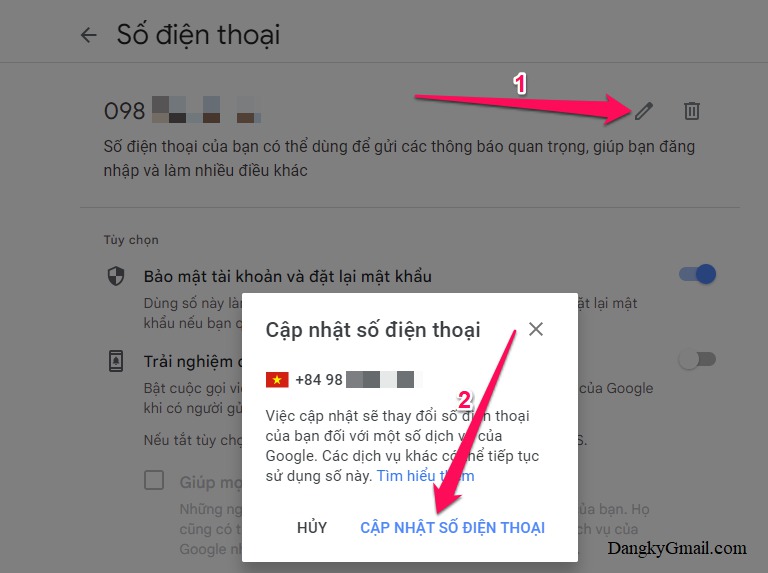
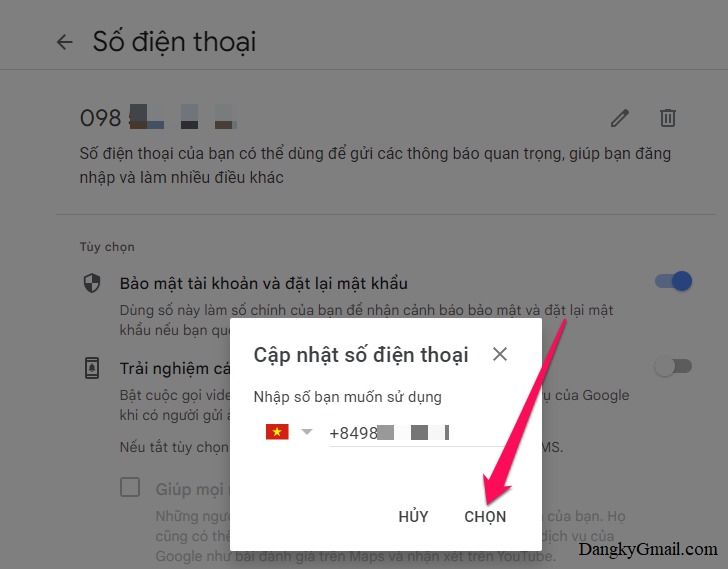
<p><span style="font-size:14px;">Bước 2: Nhấn vào nút&nbsp;&nbsp;hình cây bút&nbsp;&nbsp;bên phải số điện thoại → Tiếp tục nhấn nút&nbsp;&nbsp;Cập nhật số điện thoại&nbsp;&nbsp;→ Nhập số điện thoại bạn muốn thay đổi rồi nhấn nút&nbsp;&nbsp;Chọn&nbsp;</span></p>

<figure><span style="font-size:14px;"><a data-rel="lightbox-gallery-3" data-rl_caption="" data-rl_title="" href="https://dangkygmail.com/wp-content/uploads/2016/03/Them-doi-xoa-so-dien-thoai-khoi-phuc-Gmail-12.jpg" title=""><img alt="undefined" aria-describedby="gallery-3-1504" height="573" loading="lazy" sizes="(max-width: 768px) 100vw, 768px" src="http://thanhphuoc.edu.vn/uploads/news/2023_02/them-doi-xoa-so-dien-thoai-khoi-phuc-gmail-12.jpg" srcset="https://dangkygmail.com/wp-content/uploads/2016/03/Them-doi-xoa-so-dien-thoai-khoi-phuc-Gmail-12.jpg 768w, https://dangkygmail.com/wp-content/uploads/2016/03/Them-doi-xoa-so-dien-thoai-khoi-phuc-Gmail-12-150x112.jpg 150w, https://dangkygmail.com/wp-content/uploads/2016/03/Them-doi-xoa-so-dien-thoai-khoi-phuc-Gmail-12-300x224.jpg 300w, https://dangkygmail.com/wp-content/uploads/2016/03/Them-doi-xoa-so-dien-thoai-khoi-phuc-Gmail-12-65x48.jpg 65w, https://dangkygmail.com/wp-content/uploads/2016/03/Them-doi-xoa-so-dien-thoai-khoi-phuc-Gmail-12-220x164.jpg 220w, https://dangkygmail.com/wp-content/uploads/2016/03/Them-doi-xoa-so-dien-thoai-khoi-phuc-Gmail-12-134x100.jpg 134w, https://dangkygmail.com/wp-content/uploads/2016/03/Them-doi-xoa-so-dien-thoai-khoi-phuc-Gmail-12-217x162.jpg 217w, https://dangkygmail.com/wp-content/uploads/2016/03/Them-doi-xoa-so-dien-thoai-khoi-phuc-Gmail-12-214x160.jpg 214w, https://dangkygmail.com/wp-content/uploads/2016/03/Them-doi-xoa-so-dien-thoai-khoi-phuc-Gmail-12-466x348.jpg 466w, https://dangkygmail.com/wp-content/uploads/2016/03/Them-doi-xoa-so-dien-thoai-khoi-phuc-Gmail-12-541x404.jpg 541w, https://dangkygmail.com/wp-content/uploads/2016/03/Them-doi-xoa-so-dien-thoai-khoi-phuc-Gmail-12-697x520.jpg 697w, https://dangkygmail.com/wp-content/uploads/2016/03/Them-doi-xoa-so-dien-thoai-khoi-phuc-Gmail-12-86x64.jpg 86w" width="768" /></a></span>

<figcaption id="gallery-3-1504"><span style="font-size:14px;">Nhấn vào nút hình cây bút bên phải số điện thoại → Tiếp tục nhấn nút Cập nhật số điện thoại</span></figcaption>
</figure>

<figure><span style="font-size:14px;"><a data-rel="lightbox-gallery-3" data-rl_caption="" data-rl_title="" href="https://dangkygmail.com/wp-content/uploads/2016/03/Them-doi-xoa-so-dien-thoai-khoi-phuc-Gmail-13.jpg" title=""><img alt="" aria-describedby="gallery-3-1505" height="569" loading="lazy" sizes="(max-width: 728px) 100vw, 728px" src="https://dangkygmail.com/wp-content/uploads/2016/03/Them-doi-xoa-so-dien-thoai-khoi-phuc-Gmail-13.jpg" srcset="https://dangkygmail.com/wp-content/uploads/2016/03/Them-doi-xoa-so-dien-thoai-khoi-phuc-Gmail-13.jpg 728w, https://dangkygmail.com/wp-content/uploads/2016/03/Them-doi-xoa-so-dien-thoai-khoi-phuc-Gmail-13-150x117.jpg 150w, https://dangkygmail.com/wp-content/uploads/2016/03/Them-doi-xoa-so-dien-thoai-khoi-phuc-Gmail-13-300x234.jpg 300w, https://dangkygmail.com/wp-content/uploads/2016/03/Them-doi-xoa-so-dien-thoai-khoi-phuc-Gmail-13-65x51.jpg 65w, https://dangkygmail.com/wp-content/uploads/2016/03/Them-doi-xoa-so-dien-thoai-khoi-phuc-Gmail-13-220x172.jpg 220w, https://dangkygmail.com/wp-content/uploads/2016/03/Them-doi-xoa-so-dien-thoai-khoi-phuc-Gmail-13-128x100.jpg 128w, https://dangkygmail.com/wp-content/uploads/2016/03/Them-doi-xoa-so-dien-thoai-khoi-phuc-Gmail-13-207x162.jpg 207w, https://dangkygmail.com/wp-content/uploads/2016/03/Them-doi-xoa-so-dien-thoai-khoi-phuc-Gmail-13-205x160.jpg 205w, https://dangkygmail.com/wp-content/uploads/2016/03/Them-doi-xoa-so-dien-thoai-khoi-phuc-Gmail-13-445x348.jpg 445w, https://dangkygmail.com/wp-content/uploads/2016/03/Them-doi-xoa-so-dien-thoai-khoi-phuc-Gmail-13-517x404.jpg 517w, https://dangkygmail.com/wp-content/uploads/2016/03/Them-doi-xoa-so-dien-thoai-khoi-phuc-Gmail-13-665x520.jpg 665w, https://dangkygmail.com/wp-content/uploads/2016/03/Them-doi-xoa-so-dien-thoai-khoi-phuc-Gmail-13-86x67.jpg 86w" width="728" /></a></span>

<figcaption id="gallery-3-1505"><span style="font-size:14px;">Nhập số điện thoại bạn muốn thay đổi rồi nhấn nút Chọn</span></figcaption>
</figure>

<p><span style="font-size:14px;">Sau đó làm tương tự theo hướng dẫn như trong&nbsp;&nbsp;bước 3 và bước 4&nbsp;&nbsp;ở phần 1 để xác minh số điện thoại mới</span></p>

<p><span style="font-size:14px;">Mọi thay đổi số điện thoại khôi phục đều sẽ có email thông báo về Gmail từ Google</span></p>

<h2><span style="font-size:14px;"><strong>3. Cách xóa số điện thoại khôi phục tài khoản Gmail</strong></span></h2>

<p><span style="font-size:14px;">Bước 1: Mở thiết lập số điện thoại cho tài khoản Gmail theo link này:&nbsp;<a href="https://myaccount.google.com/phone" rel="noopener noreferrer" target="_blank">https://myaccount.google.com/phone</a></span></p>

<p><span style="font-size:14px;">hoặc theo cách khác như trong hướng dẫn ở&nbsp;&nbsp;bước 1 phần 1&nbsp;</span></p>

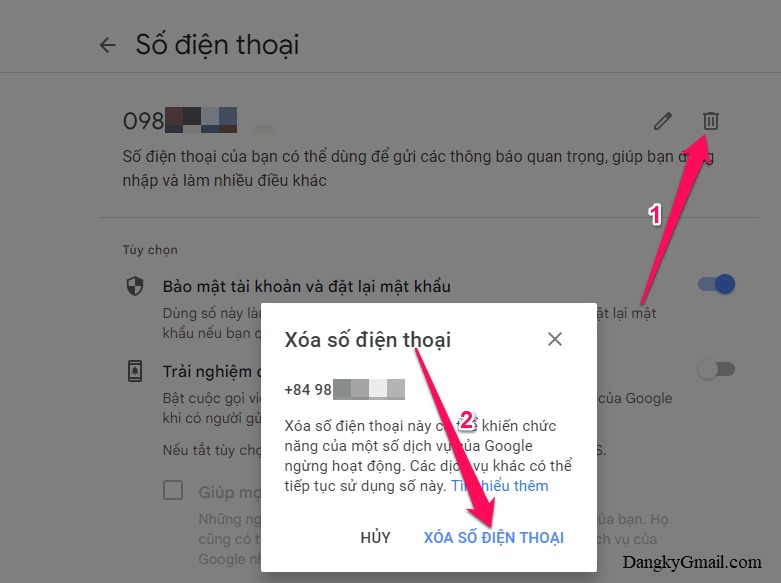
<p><span style="font-size:14px;">Bước 2: Nhấn vào nút&nbsp;&nbsp;hình thùng rác&nbsp;&nbsp;bên phải số điện thoại khôi phục → Nhấn nút&nbsp;&nbsp;Xóa số điện thoại&nbsp;</span></p>

<p><span style="font-size:14px;">Có thể bạn sẽ bị Gmail yêu cầu đăng nhập lại, nếu vậy bạn phải đăng nhập lại và làm lại bước 2</span></p>

<p><span style="font-size:14px;"><a data-rel="lightbox-image-3" data-rl_caption="" data-rl_title="" href="https://dangkygmail.com/wp-content/uploads/2016/03/Them-doi-xoa-so-dien-thoai-khoi-phuc-Gmail-11.jpg" title=""><img alt="undefined" height="583" loading="lazy" sizes="(max-width: 781px) 100vw, 781px" src="http://thanhphuoc.edu.vn/uploads/news/2023_02/them-doi-xoa-so-dien-thoai-khoi-phuc-gmail-11.jpg" srcset="https://dangkygmail.com/wp-content/uploads/2016/03/Them-doi-xoa-so-dien-thoai-khoi-phuc-Gmail-11.jpg 781w, https://dangkygmail.com/wp-content/uploads/2016/03/Them-doi-xoa-so-dien-thoai-khoi-phuc-Gmail-11-150x112.jpg 150w, https://dangkygmail.com/wp-content/uploads/2016/03/Them-doi-xoa-so-dien-thoai-khoi-phuc-Gmail-11-300x224.jpg 300w, https://dangkygmail.com/wp-content/uploads/2016/03/Them-doi-xoa-so-dien-thoai-khoi-phuc-Gmail-11-768x573.jpg 768w, https://dangkygmail.com/wp-content/uploads/2016/03/Them-doi-xoa-so-dien-thoai-khoi-phuc-Gmail-11-65x49.jpg 65w, https://dangkygmail.com/wp-content/uploads/2016/03/Them-doi-xoa-so-dien-thoai-khoi-phuc-Gmail-11-220x164.jpg 220w, https://dangkygmail.com/wp-content/uploads/2016/03/Them-doi-xoa-so-dien-thoai-khoi-phuc-Gmail-11-134x100.jpg 134w, https://dangkygmail.com/wp-content/uploads/2016/03/Them-doi-xoa-so-dien-thoai-khoi-phuc-Gmail-11-217x162.jpg 217w, https://dangkygmail.com/wp-content/uploads/2016/03/Them-doi-xoa-so-dien-thoai-khoi-phuc-Gmail-11-214x160.jpg 214w, https://dangkygmail.com/wp-content/uploads/2016/03/Them-doi-xoa-so-dien-thoai-khoi-phuc-Gmail-11-466x348.jpg 466w, https://dangkygmail.com/wp-content/uploads/2016/03/Them-doi-xoa-so-dien-thoai-khoi-phuc-Gmail-11-541x404.jpg 541w, https://dangkygmail.com/wp-content/uploads/2016/03/Them-doi-xoa-so-dien-thoai-khoi-phuc-Gmail-11-697x520.jpg 697w, https://dangkygmail.com/wp-content/uploads/2016/03/Them-doi-xoa-so-dien-thoai-khoi-phuc-Gmail-11-86x64.jpg 86w" title="Nhấn vào nút hình thùng rác bên phải số điện thoại khôi phục → Nhấn nút Xóa số điện thoại" width="781" /></a></span></p>

<p><span style="font-size:14px;">Mọi thay đổi số điện thoại khôi phục đều sẽ có email thông báo về Gmail từ Google</span></p>

<p><span style="font-size:14px;">Bạn có thể thêm lại số điện thoại như hướng dẫn trong&nbsp;&nbsp;phần 1&nbsp;.</span></p>

<p><span style="font-size:14px;">Chúc các bạn thành công!!!</span></p>
&nbsp;
		</div>
	</div>
	<div id="footer" class="clearfix">
		<div id="url">
			<strong>URL của bản tin này: </strong><a href="http://thanhphuoc.edu.vn/vi/news/hoat-dong-cong-nghe-thong-tin/huong-dan-cach-them-thay-doi-xoa-so-dien-thoai-khoi-phuc-gmail-18.html" title="Hướng dẫn cách thêm, thay đổi, xóa số điện thoại khôi phục Gmail">http://thanhphuoc.edu.vn/vi/news/hoat-dong-cong-nghe-thong-tin/huong-dan-cach-them-thay-doi-xoa-so-dien-thoai-khoi-phuc-gmail-18.html</a>

		</div>
		<div class="clear"></div>
		<div class="copyright">
			&copy; Tiểu học Thạnh Phước
		</div>
		<div id="contact">
			<a href="mailto:tieuhoc@thanhphuoc.edu.vn">tieuhoc@thanhphuoc.edu.vn</a>
		</div>
	</div>
</div>
        <div id="timeoutsess" class="chromeframe">
            Bạn đã không sử dụng Site, <a onclick="timeoutsesscancel();" href="http://thanhphuoc.edu.vn/#">Bấm vào đây để duy trì trạng thái đăng nhập</a>. Thời gian chờ: <span id="secField"> 60 </span> giây
        </div>
        <div id="openidResult" class="nv-alert" style="display:none"></div>
        <div id="openidBt" data-result="" data-redirect=""></div>
<script src="http://thanhphuoc.edu.vn/assets/js/jquery/jquery.min.js"></script>
<script>var nv_base_siteurl="/",nv_lang_data="vi",nv_lang_interface="vi",nv_name_variable="nv",nv_fc_variable="op",nv_lang_variable="language",nv_module_name="news",nv_func_name="savefile",nv_is_user=0, nv_my_ofs=7,nv_my_abbr="+07",nv_cookie_prefix="nv4",nv_check_pass_mstime=1738000,nv_area_admin=0,nv_safemode=0,theme_responsive=0,nv_recaptcha_ver=3,nv_recaptcha_sitekey="6LcMbUYhAAAAAJzdrmrIoHEO-jZYxDFSKCa5c8zE",nv_recaptcha_type="image",XSSsanitize=1;</script>
<script src="http://thanhphuoc.edu.vn/assets/js/language/vi.js"></script>
<script src="http://thanhphuoc.edu.vn/assets/js/DOMPurify/purify.js"></script>
<script src="http://thanhphuoc.edu.vn/assets/js/global.js"></script>
<script src="http://thanhphuoc.edu.vn/assets/js/site.js"></script>
<script src="http://thanhphuoc.edu.vn/themes/default/js/news.js"></script>
<script src="http://thanhphuoc.edu.vn/themes/default/js/main.js"></script>
<script src="http://thanhphuoc.edu.vn/themes/default/js/custom.js"></script>
<script type="application/ld+json">
        {
            "@context": "https://schema.org",
            "@type": "Organization",
            "url": "http://thanhphuoc.edu.vn",
            "logo": "http://thanhphuoc.edu.vn/uploads/unnamed.webp"
        }
        </script>
<script src="http://thanhphuoc.edu.vn/themes/default/js/bootstrap.min.js"></script>
</body>
</html>